
Externe Ssd-festplatten

1080PRO 4 TB 2 TB 1 TB Original M2 2280 PCIe 4.0 NVMe SSD Solid-State-Laufwerk

SSD-Erweiterungs-Upgrade: 32 TB, 16 TB, 8 TB, 2 TB Externe tragbare Festplatte
1080PRO 4 TB 2 TB 1 TB Original M2 2280 PCIe 4.0 NVMe SSD Solid-State-Laufwerk

Cross-Border Exclusive SSD Mobile Solid State Drive 1TB Expansi Portable External Ultra-Thin 2TB High-Speed
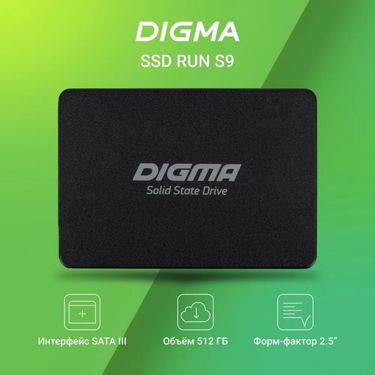
SSD (integriertes Solid-State-Laufwerk), 2,5 Zoll, SATA 3.0-Upgrade, 4 TB/2 TB/1 TB

256 GB NVMe PCIe 3.0 SSD – M.2 2280 Internes Solid-State-Laufwerk für Laptops und Desktop-PCs, ultraschnelle Lese-/Schreibgeschwindigkeiten

NVMe NGFF SSD Solid State auf USB 3.1 Typ C-A Adapter Festplattenbox M.2 Dual Protocol Bare Card Direct Plug

980EVO Solid-State-Drive SSD 1 TB 512 GB Laptop Desktop Universal High Speed

Grenzüberschreitende 870EVO SSD 1TB 2TB 4TB SATA3 2,5 Zoll Desktop Notebook Universal

980 990PRO NVME-Protokoll Integrierte SSD-Erweiterung 4 TB 2 TB Hochgeschwindigkeitsübertragung
980EVO Solid-State-Drive SSD 1 TB 512 GB Laptop Desktop Universal High Speed

Hochgeschwindigkeits-SATA3-Star-Solid-State-Laufwerk 870EVO 1 TB, 2 TB, 4 TB, neutrales Erweiterungs-Upgrade-SSD

2,5-Zoll-Hochgeschwindigkeits-SATA-3.0-Solid-State-Drive (4 TB), erweiterbar auf 512 GB/1 TB oder 2 TB (SSD)
1080PRO 4 TB 2 TB 1 TB Original M2 2280 PCIe 4.0 NVMe SSD Solid-State-Laufwerk

M.2 NGFF SSD 32 GB–4 TB für Laptop und Desktop – PCIe NVMe/SATA, Hochgeschwindigkeitsspeicher, kompatibel mit Windows/Mac/Linux, Gaming

SSD 1 TB Cross-Border 4 TB Portable Solid State Drive 2 TB

870QVO High Speed SATA3 SSD 1 TB 2 TB 4 TB Neutraler Erweiterungsspeicher
M.2 NGFF SSD 32 GB–4 TB für Laptop und Desktop – PCIe NVMe/SATA, Hochgeschwindigkeitsspeicher, kompatibel mit Windows/Mac/Linux, Gaming
980 990PRO NVME-Protokoll Integrierte SSD-Erweiterung 4 TB 2 TB Hochgeschwindigkeitsübertragung
Grenzüberschreitende 870EVO SSD 1TB 2TB 4TB SATA3 2,5 Zoll Desktop Notebook Universal
External Solid State Drives for Faster, Easier Storage Anywhere
If your storage has been feeling like it’s always one step behind—files taking too long to open, backups dragging on forever, or your laptop running out of space at the worst time—you’re definitely not alone. More and more people are realizing that fast storage isn’t just for inside the computer anymore.
That’s where external SSDs come in. They’re small, fast, and built for the kind of life where you’re moving between work, travel, gaming, and creative projects. Once you start using one, you’ll wonder how you managed with slow drives for so long.
Why External SSDs Are Changing Everyday Storage
Traditional portable drives have been doing the job for years, but they’re often struggling to keep up with modern file sizes. When you’re transferring large videos, game libraries, or design projects, speed starts to matter immediately.
Even upgrading to something like a 512gb ssd externally will make everyday file access feel smoother. Instead of waiting for spinning disks, you’ll be working with storage that responds almost instantly—especially when you’re constantly on the move.
Key Benefits: Speed, Portability, and Quiet Reliability
One of the best things about external SSDs is that they’re built to travel. You can toss them in a bag, plug them in anywhere, and keep working without worrying about fragile moving parts.
A larger option like a 1tb ssd gives you space for your most important files while still staying compact. And since SSDs run silently, they fit perfectly into quiet setups—whether you’re editing late at night or working in a shared space.
Common Use Scenarios: Gaming, Creativity, and Daily Work
External SSDs are showing up everywhere now. Gamers are using an external ssd for gaming because nobody wants loading screens slowing down the experience.
Creators are leaning on fast drives for photo and video workflows, especially when projects are too big to live on a laptop. Some people still keep sd memory card for cameras and drones, but having an SSD nearby makes transferring and editing so much faster.
And even if you’re building a minimalist setup with a fanless mini pc, external SSD storage will be giving you extra space without adding noise or clutter.
Choosing the Right Capacity and Setup for Your Routine
Storage choices depend on how you’re actually working. A 500gb ssd might be enough for basic documents and light backups, but larger libraries will fill up quickly.
If you’re planning ahead, many users are moving toward a 2tb ssd, because it gives flexibility without forcing constant file management.
Your setup matters too. Whether you’re connecting through a laptop, docking station, or even alongside a computer monitor cable setup at your desk, an external SSD keeps your storage accessible without taking over your workspace.
Backup, Organization, and Smarter File Protection
External SSDs are also becoming the go-to tool for backups, especially for personal media. If you’ve ever worried about losing family pictures or creative work, having an external hard drive for photos (or SSD equivalent) will bring peace of mind.
Many people still use older drives for archive storage, but once you’ve experienced SSD speed, even basic backups start feeling less like a chore and more like a quick habit.
And because you can easily unplug and store them safely, they’re also great for keeping sensitive files separate from your main computer.
 4.4 out of 5 based on 9,249 reviews